


'%3e%3cpath%20d='M10%2020C15.5228%2020%2020%2015.5228%2020%2010C20%204.47715%2015.5228%200%2010%200C4.47715%200%200%204.47715%200%2010C0%2015.5228%204.47715%2020%2010%2020Z'%20fill='%23F0F0F0'/%3e%3cpath%20d='M19.378%2013.4785C19.78%2012.3951%2020%2011.2234%2020%2010.0002C20%208.77701%2019.78%207.60529%2019.378%206.52197H0.621992C0.220039%207.60529%200%208.77701%200%2010.0002C0%2011.2234%200.220039%2012.3951%200.621992%2013.4785L10%2014.348L19.378%2013.4785Z'%20fill='%230052B4'/%3e%3cpath%20d='M9.9991%2019.9998C14.2987%2019.9998%2017.9642%2017.286%2019.3771%2013.478H0.621094C2.03402%2017.286%205.69945%2019.9998%209.9991%2019.9998Z'%20fill='%23D80027'/%3e%3c/g%3e%3cdefs%3e%3cclipPath%20id='clip0_586_4336'%3e%3crect%20width='20'%20height='20'%20fill='white'/%3e%3c/clipPath%3e%3c/defs%3e%3c/svg%3e)
'%3e%3cpath%20d='M10%2020C15.5228%2020%2020%2015.5228%2020%2010C20%204.47715%2015.5228%200%2010%200C4.47715%200%200%204.47715%200%2010C0%2015.5228%204.47715%2020%2010%2020Z'%20fill='%23F0F0F0'/%3e%3cpath%20d='M9.56445%209.99982H19.9992C19.9992%209.09725%2019.8789%208.22287%2019.6547%207.39111H9.56445V9.99982Z'%20fill='%23D80027'/%3e%3cpath%20d='M9.56445%204.78254H18.5315C17.9193%203.78363%2017.1366%202.9007%2016.2241%202.17383H9.56445V4.78254Z'%20fill='%23D80027'/%3e%3cpath%20d='M9.99828%2020.0001C12.3518%2020.0001%2014.5149%2019.1866%2016.2231%2017.8262H3.77344C5.48164%2019.1866%207.6448%2020.0001%209.99828%2020.0001Z'%20fill='%23D80027'/%3e%3cpath%20d='M1.46699%2015.2171H18.5315C19.023%2014.4152%2019.4041%2013.5386%2019.6548%2012.6084H0.34375C0.594414%2013.5386%200.975547%2014.4152%201.46699%2015.2171Z'%20fill='%23D80027'/%3e%3cpath%20d='M4.63219%201.56164H5.54348L4.69582%202.17746L5.01961%203.17391L4.17199%202.55809L3.32437%203.17391L3.60406%202.31309C2.85773%202.93477%202.20359%203.66313%201.66453%204.47469H1.95652L1.41695%204.86668C1.33289%205.00691%201.25227%205.14937%201.175%205.29395L1.43266%206.08695L0.951953%205.7377C0.832461%205.99086%200.723164%206.24973%200.624922%206.51398L0.908789%207.38773H1.95652L1.10887%208.00356L1.43266%209L0.585039%208.38418L0.0773047%208.75309C0.0264844%209.1616%200%209.57769%200%2010H10C10%204.47719%2010%203.82609%2010%200C8.02453%200%206.18301%200.573047%204.63219%201.56164ZM5.01961%209L4.17199%208.38418L3.32437%209L3.64816%208.00356L2.80051%207.38773H3.84824L4.17199%206.39129L4.49574%207.38773H5.54348L4.69582%208.00356L5.01961%209ZM4.69582%205.09051L5.01961%206.08695L4.17199%205.47113L3.32437%206.08695L3.64816%205.09051L2.80051%204.47469H3.84824L4.17199%203.47824L4.49574%204.47469H5.54348L4.69582%205.09051ZM8.60656%209L7.75895%208.38418L6.91133%209L7.23512%208.00356L6.38746%207.38773H7.4352L7.75895%206.39129L8.0827%207.38773H9.13043L8.28277%208.00356L8.60656%209ZM8.28277%205.09051L8.60656%206.08695L7.75895%205.47113L6.91133%206.08695L7.23512%205.09051L6.38746%204.47469H7.4352L7.75895%203.47824L8.0827%204.47469H9.13043L8.28277%205.09051ZM8.28277%202.17746L8.60656%203.17391L7.75895%202.55809L6.91133%203.17391L7.23512%202.17746L6.38746%201.56164H7.4352L7.75895%200.565195L8.0827%201.56164H9.13043L8.28277%202.17746Z'%20fill='%230052B4'/%3e%3c/g%3e%3cdefs%3e%3cclipPath%20id='clip0_1008_13251'%3e%3crect%20width='20'%20height='20'%20fill='white'/%3e%3c/clipPath%3e%3c/defs%3e%3c/svg%3e)
'%3e%3cpath%20d='M10%2020C15.5228%2020%2020%2015.5228%2020%2010C20%204.47715%2015.5228%200%2010%200C4.47715%200%200%204.47715%200%2010C0%2015.5228%204.47715%2020%2010%2020Z'%20fill='%23F0F0F0'/%3e%3cpath%20d='M0.34375%2012.6089C1.26711%2016.0348%203.96465%2018.7324%207.39059%2019.6557V12.6089H0.34375Z'%20fill='%23D80027'/%3e%3cpath%20d='M7.39055%200.344727C3.96465%201.26805%201.26707%203.96562%200.34375%207.39152H7.39059V0.344727H7.39055Z'%20fill='%230052B4'/%3e%3cpath%20d='M19.6562%207.39152C18.7329%203.96562%2016.0353%201.26805%2012.6094%200.344727V7.39156H19.6562V7.39152Z'%20fill='%23D80027'/%3e%3cpath%20d='M12.6094%2019.6557C16.0353%2018.7324%2018.7329%2016.0348%2019.6562%2012.6089H12.6094V19.6557Z'%20fill='%230052B4'/%3e%3cpath%20d='M12.608%209.99982C12.608%2011.4406%2011.4401%2012.6085%209.99934%2012.6085C8.55859%2012.6085%207.39062%2011.4406%207.39062%209.99982C7.39062%208.55904%209.99934%207.39111%209.99934%207.39111C9.99934%207.39111%2012.608%208.55904%2012.608%209.99982Z'%20fill='%23496E2D'/%3e%3cpath%20d='M7.39062%209.99982C7.39062%208.55904%208.55859%207.39111%209.99934%207.39111C11.4401%207.39111%2012.608%208.55904%2012.608%209.99982'%20fill='%230052B4'/%3e%3cpath%20d='M8.5332%208.6958V10.3262C8.5332%2011.1367%209.19016%2011.7936%2010.0006%2011.7936C10.811%2011.7936%2011.468%2011.1367%2011.468%2010.3262V8.6958H8.5332Z'%20fill='%23D80027'/%3e%3c/g%3e%3cdefs%3e%3cclipPath%20id='clip0_1008_13324'%3e%3crect%20width='20'%20height='20'%20fill='white'/%3e%3c/clipPath%3e%3c/defs%3e%3c/svg%3e)


Set up integration with Zoho CRM
Settings are displayed in the Integration with CRM section after the integration is connected.
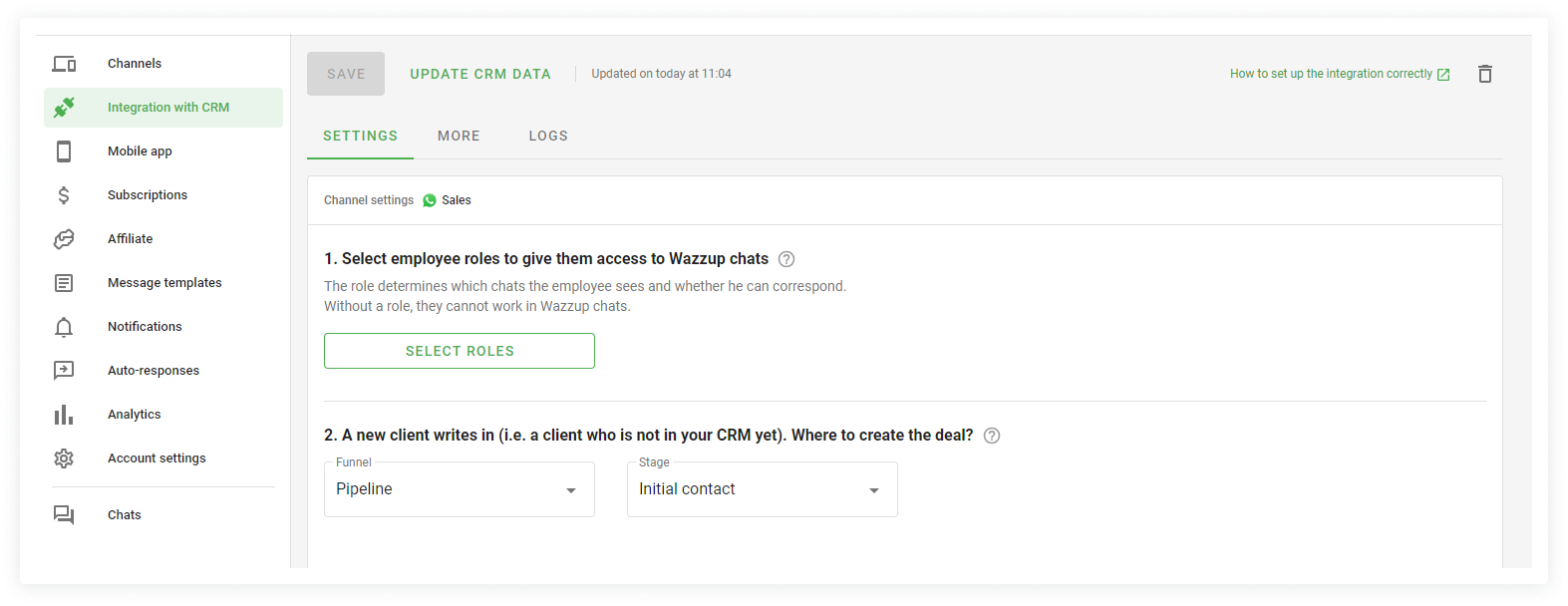
Main settings
If you have multiple channels connected, you need to configure integration for each channel separately.
1. Select employee roles
The role determines the employee's rights — which chats they see and whether they can correspond with customers. There are three roles:
- Quality Control — checks sales reps' work. They see all sales reps' correspondence, but can't write anything.
- Sales rep — communicates with clients and conducts deals. They can only write to the clients he is responsible for in the CRM. They cannot see the correspondence of other sales reps.
- Manager — manages and supervises large deals. They see the correspondence of all sales reps and can write to any client.
The "Select roles" button opens a window with the selection of employee roles.
The "Receives new clients" slider allows the employee to participate in the distribution of new clients.
If a deal or lead is created, the manager participates in the distribution of the client in turn and gets the right to become responsible for the client in the CRM.
2. A new client has written (a client who is not in the CRM). Where do I create a deal?
To create a deal, select the name of the funnel in the left drop-down list — "Standard", in the right drop-down list select the name of the stage. The contact will be created automatically when the deal is created.
To create a lead, select "Lead" in the left drop-down list and its status in the right drop-down list.
Additional settings
Go to the "More" tab to configure additional settings. Additional settings apply to all channels at once.
1. Save messages to the event feed of the lead, contact and deal
To see saved messages, go to Wazzup Log item on the left panel in the lead, contact or deal card in Zoho CRM. If the setting is disabled, the Wazzup log item in the left panel will appear, but the messages will not be displayed there.
2. Notify managers on all messages
This setting may be needed if in the settings item "Select employee roles" you have salespeople with the "Manager" role.
Enable the setting if sellers with the "Manager" role need to get notifications from all Wazzup chats. Not only chats they're responsible for, but also their colleagues' chats.
This is how online stores and support departments work: customers come with simple questions and it doesn't matter who answers them.
Without the setting enabled sellers with the "Sales rep" role receive notifications in Wazzup only from chats with clients they are responsible for. The "unanswered" icons in such chats will be red.
Notifications are not received from other sellers' chats, and their "unanswered" icons are grey.
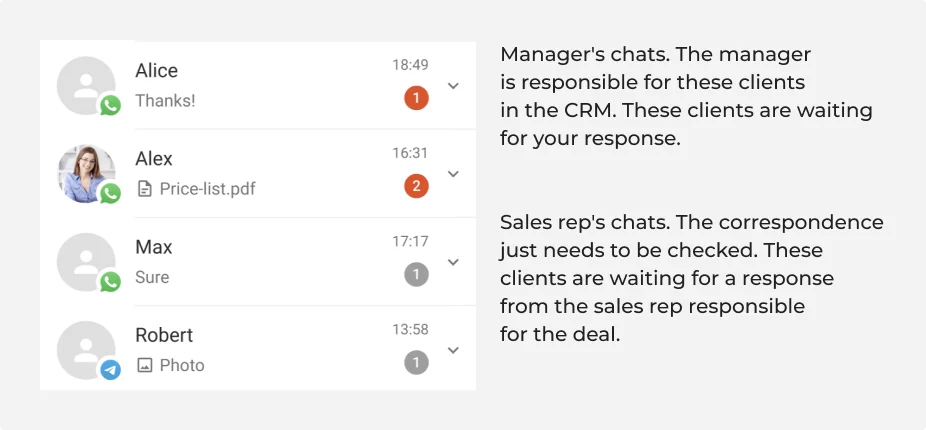
This is how classic sales departments work, where the manager not only controls the seller, but also leads his own clients.
3. Hide client phone numbers in Wazzup for selected employees
This setting helps protect your client base.
When enabled, phone numbers are hidden in Wazzup chats in the CRM and in Wazzup apps. Selected employees see only the first and last digits: +52 55 *** *** 34.
This setting does not affect usernames: they will be displayed in full in chats.
4. Priority channel
This setting item includes employees who have access to several WhatsApp or Telegram channels. If you do not have such employees, this item will not be in.
For each sales rep, select the channel from which they will write clients first by default.
If a seller needs to send a message from another channel, no problem. When sending a message, they will be able to change it.
API key
If you lack the functionality of the ready integration, you can refine it with the API.
After you set up everything, click "Save".
That's it, you've configured which chats will be seen by salespeople and how customers will be distributed between them. A window will pop up asking you to test the chats. We will automatically send you a test message to the first WhatsApp, WhatsApp Business API (WABA) or Telegram channel you add. You'll be able to go straight to the chats and test the integration or do it later.