


'%3e%3cpath%20d='M10%2020C15.5228%2020%2020%2015.5228%2020%2010C20%204.47715%2015.5228%200%2010%200C4.47715%200%200%204.47715%200%2010C0%2015.5228%204.47715%2020%2010%2020Z'%20fill='%23F0F0F0'/%3e%3cpath%20d='M19.378%2013.4785C19.78%2012.3951%2020%2011.2234%2020%2010.0002C20%208.77701%2019.78%207.60529%2019.378%206.52197H0.621992C0.220039%207.60529%200%208.77701%200%2010.0002C0%2011.2234%200.220039%2012.3951%200.621992%2013.4785L10%2014.348L19.378%2013.4785Z'%20fill='%230052B4'/%3e%3cpath%20d='M9.9991%2019.9998C14.2987%2019.9998%2017.9642%2017.286%2019.3771%2013.478H0.621094C2.03402%2017.286%205.69945%2019.9998%209.9991%2019.9998Z'%20fill='%23D80027'/%3e%3c/g%3e%3cdefs%3e%3cclipPath%20id='clip0_586_4336'%3e%3crect%20width='20'%20height='20'%20fill='white'/%3e%3c/clipPath%3e%3c/defs%3e%3c/svg%3e)
'%3e%3cpath%20d='M10%2020C15.5228%2020%2020%2015.5228%2020%2010C20%204.47715%2015.5228%200%2010%200C4.47715%200%200%204.47715%200%2010C0%2015.5228%204.47715%2020%2010%2020Z'%20fill='%23F0F0F0'/%3e%3cpath%20d='M9.56445%209.99982H19.9992C19.9992%209.09725%2019.8789%208.22287%2019.6547%207.39111H9.56445V9.99982Z'%20fill='%23D80027'/%3e%3cpath%20d='M9.56445%204.78254H18.5315C17.9193%203.78363%2017.1366%202.9007%2016.2241%202.17383H9.56445V4.78254Z'%20fill='%23D80027'/%3e%3cpath%20d='M9.99828%2020.0001C12.3518%2020.0001%2014.5149%2019.1866%2016.2231%2017.8262H3.77344C5.48164%2019.1866%207.6448%2020.0001%209.99828%2020.0001Z'%20fill='%23D80027'/%3e%3cpath%20d='M1.46699%2015.2171H18.5315C19.023%2014.4152%2019.4041%2013.5386%2019.6548%2012.6084H0.34375C0.594414%2013.5386%200.975547%2014.4152%201.46699%2015.2171Z'%20fill='%23D80027'/%3e%3cpath%20d='M4.63219%201.56164H5.54348L4.69582%202.17746L5.01961%203.17391L4.17199%202.55809L3.32437%203.17391L3.60406%202.31309C2.85773%202.93477%202.20359%203.66313%201.66453%204.47469H1.95652L1.41695%204.86668C1.33289%205.00691%201.25227%205.14937%201.175%205.29395L1.43266%206.08695L0.951953%205.7377C0.832461%205.99086%200.723164%206.24973%200.624922%206.51398L0.908789%207.38773H1.95652L1.10887%208.00356L1.43266%209L0.585039%208.38418L0.0773047%208.75309C0.0264844%209.1616%200%209.57769%200%2010H10C10%204.47719%2010%203.82609%2010%200C8.02453%200%206.18301%200.573047%204.63219%201.56164ZM5.01961%209L4.17199%208.38418L3.32437%209L3.64816%208.00356L2.80051%207.38773H3.84824L4.17199%206.39129L4.49574%207.38773H5.54348L4.69582%208.00356L5.01961%209ZM4.69582%205.09051L5.01961%206.08695L4.17199%205.47113L3.32437%206.08695L3.64816%205.09051L2.80051%204.47469H3.84824L4.17199%203.47824L4.49574%204.47469H5.54348L4.69582%205.09051ZM8.60656%209L7.75895%208.38418L6.91133%209L7.23512%208.00356L6.38746%207.38773H7.4352L7.75895%206.39129L8.0827%207.38773H9.13043L8.28277%208.00356L8.60656%209ZM8.28277%205.09051L8.60656%206.08695L7.75895%205.47113L6.91133%206.08695L7.23512%205.09051L6.38746%204.47469H7.4352L7.75895%203.47824L8.0827%204.47469H9.13043L8.28277%205.09051ZM8.28277%202.17746L8.60656%203.17391L7.75895%202.55809L6.91133%203.17391L7.23512%202.17746L6.38746%201.56164H7.4352L7.75895%200.565195L8.0827%201.56164H9.13043L8.28277%202.17746Z'%20fill='%230052B4'/%3e%3c/g%3e%3cdefs%3e%3cclipPath%20id='clip0_1008_13251'%3e%3crect%20width='20'%20height='20'%20fill='white'/%3e%3c/clipPath%3e%3c/defs%3e%3c/svg%3e)
'%3e%3cpath%20d='M10%2020C15.5228%2020%2020%2015.5228%2020%2010C20%204.47715%2015.5228%200%2010%200C4.47715%200%200%204.47715%200%2010C0%2015.5228%204.47715%2020%2010%2020Z'%20fill='%23F0F0F0'/%3e%3cpath%20d='M0.34375%2012.6089C1.26711%2016.0348%203.96465%2018.7324%207.39059%2019.6557V12.6089H0.34375Z'%20fill='%23D80027'/%3e%3cpath%20d='M7.39055%200.344727C3.96465%201.26805%201.26707%203.96562%200.34375%207.39152H7.39059V0.344727H7.39055Z'%20fill='%230052B4'/%3e%3cpath%20d='M19.6562%207.39152C18.7329%203.96562%2016.0353%201.26805%2012.6094%200.344727V7.39156H19.6562V7.39152Z'%20fill='%23D80027'/%3e%3cpath%20d='M12.6094%2019.6557C16.0353%2018.7324%2018.7329%2016.0348%2019.6562%2012.6089H12.6094V19.6557Z'%20fill='%230052B4'/%3e%3cpath%20d='M12.608%209.99982C12.608%2011.4406%2011.4401%2012.6085%209.99934%2012.6085C8.55859%2012.6085%207.39062%2011.4406%207.39062%209.99982C7.39062%208.55904%209.99934%207.39111%209.99934%207.39111C9.99934%207.39111%2012.608%208.55904%2012.608%209.99982Z'%20fill='%23496E2D'/%3e%3cpath%20d='M7.39062%209.99982C7.39062%208.55904%208.55859%207.39111%209.99934%207.39111C11.4401%207.39111%2012.608%208.55904%2012.608%209.99982'%20fill='%230052B4'/%3e%3cpath%20d='M8.5332%208.6958V10.3262C8.5332%2011.1367%209.19016%2011.7936%2010.0006%2011.7936C10.811%2011.7936%2011.468%2011.1367%2011.468%2010.3262V8.6958H8.5332Z'%20fill='%23D80027'/%3e%3c/g%3e%3cdefs%3e%3cclipPath%20id='clip0_1008_13324'%3e%3crect%20width='20'%20height='20'%20fill='white'/%3e%3c/clipPath%3e%3c/defs%3e%3c/svg%3e)


WABA and WhatsApp — differences, conditions, connection
There are two ways to connect WhatsApp to CRM: through integration with WhatsApp (just WhatsApp in the text below) and the official Meta solution — WhatsApp Business API (WABA).
Both solutions allow managers to correspond with clients from the CRM, but the connection process, functions and tasks of these solutions are different. Not every business will benefit from integration with WABA, and not every problem will be solved by integration with WhatsApp.
Let's look in detail at the advantages and disadvantages of each solution.
Connection — features and duration of verification
WABA
There are two ways how to connect WABA:
- without checking the company (verification) and the display name of your WhatsApp Business profile,
- with confirmation of the company and your display name.
Setting up without verification and profile name approval will take about 10 minutes. After that, you can start testing the service immediately. In this case:
- You can reply to incoming messages without any limits
- You'll be restricted in initiating conversations first
- Maximum of 250 new conversation starts per 24 hours
We'll explain more about these limits in the next section.
👉 How to connect the WABA channel
Connection with company verification and profile name approval is required if sending first messages to 250 customers within 24 hours is insufficient for you. Once you verify your company and profile name, you'll be able to increase your limit.
👉 How to verify your company and display name
There is no guarantee that the company and the display name will be verified the first time. But Meta gives you the opportunity to supplement and correct the information.
Anyone can connect WhatsApp to the CRM. You don't need to collect any documents — register, test the service, set up the integration and get to work.
Correspondence — how and how much you can write first
WABA
How messaging works on WABA channels
When you receive a message, this incoming message opens a 24-hour customer service window. During this time, you can send the contact both WABA templates and regular messages.
If the customer messages you again within 24 hours, the new incoming message extends the service window: it remains active for 24 hours from the time the last message was received.
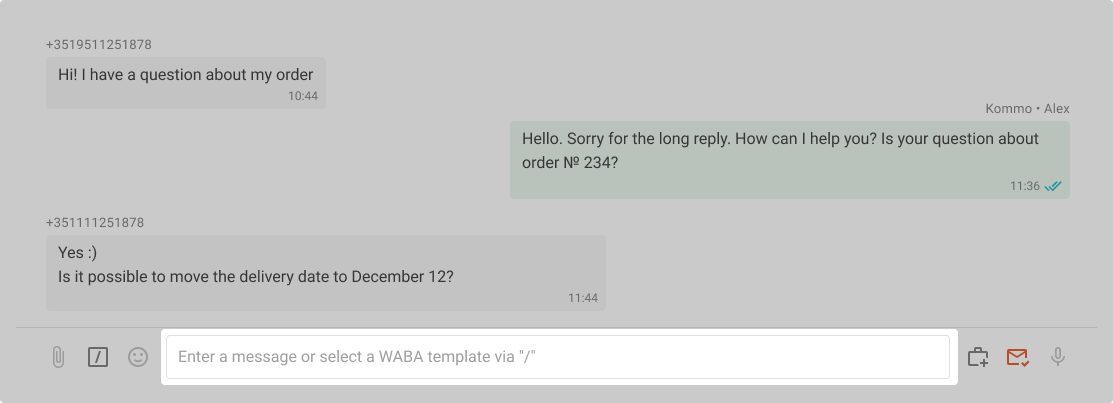
If there is no existing conversation with the contact or no incoming messages have been received in the chat in the last 24 hours, you can only send a WABA template. For example, you discussed delivery terms with a contact on Tuesday. If you want to message this customer again on Saturday, you will need to use a WABA template and wait for their reply before you can send regular messages.
What are WABA Templates
WABA templates are needed to message a customer first when there is no active service window in the chat.
You create these templates yourself and can write whatever you need in them.
WABA templates must be approved by Meta. But you won't have to deal with Facebook's interface: you can add and submit templates for moderation directly in your Wazzup account.
Creating a template takes a couple of minutes. They are usually approved within 2-3 hours after submission for moderation. Sometimes it takes a couple of days. In very, very rare cases, it can take a couple of weeks.
👉 How to create WABA templates via Wazzup
You can add buttons and variables to templates. Such templates are then convenient to use for automation via CRM, for example, for messaging campaigns or in chat bots.
Sending templates in Wazzup chats looks like this:
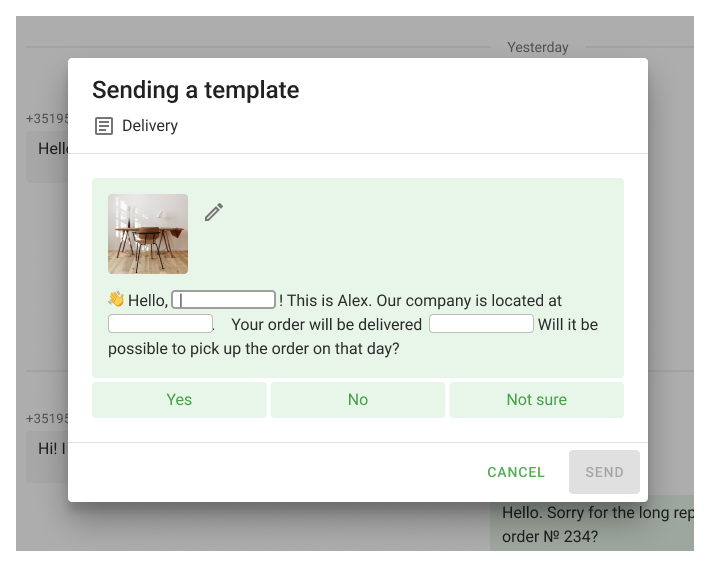
Once the universal templates are approved, you can use them. Open the chat with the customer you want to message, type your text in the input field, and send it — the text will be sent as a universal template.
👉 What are universal templates and how do they work
Messaging Limits
Meta limits the number of conversations you can initiate within 24 hours. Initiating a conversation means sending a WABA template outside of a service window.
Once you connect your first WABA channel, a limit of 250 conversations applies. Meta will gradually increase this limit: to 2,000, 10,000, 100,000, and eventually remove all restrictions.
If a customer messages you first, you can reply with regular messages as much as you want — the limits only apply to templates.
For example, you just connected WABA and are at Tier 0. Salesperson received messages from 100 people in 24 hours — he can reply to all these inquiries because incoming messages are unlimited. He can also send 250 templates outside of service windows, meaning he can start conversations with 250 new customers by sending each one template. In total, the salesperson can communicate with 350 customers in 24 hours. A very productive salesperson.
How to message first more often
First, verify your business and profile name. Sometimes Meta also requests identity verification. If required, you'll see a notification in WhatsApp Manager → Overview → Restrictions asking you to verify your identity.
Afterwards, limits depend on the quantity and quality of your conversations. If you initiate many conversations and customers don't complain about your messages - Meta will allow you to send more templates.
To upgrade from Tier 0 to Tier 1, you must meet Meta's requirements:
- send at least 1,000 templates outside service windows within 30 days. This means initiating conversations with 33-34 new contacts daily who haven't sent you incoming messages in the last 24 hours
- send high-quality templates. Meaning WABA templates that contacts don't complain about.
To initiate a WhatsApp correspondence, you only need the client's phone number. The seller can initiate correspondence with the client without restrictions. The exception is bulk messaging campaigns, but more on that below.
Stability of work
WABA
Connection is done via the official API key — this is the most reliable way to work with WhatsApp.
You don't need a phone with the WhatsApp app, and in case of WABA, there are no headaches due to sudden authorisation failures. Connect the number once when connecting the integration and forget it.
The stability of work with WhatsApp is affected by messenger updates. Of course, Zuckerberg does not warn "grey" integrators about them. Developers need some time to adapt the work of the service to the updates.
Also, Facebook itself can knock authorisation out of linked devices, including Wazzup. This happens if the account is suspected of spam or decided to ban. Then sellers will be out of touch for a while, and you'll have to scan a QR code or even write to support if the number is banned.
You should also keep an eye on your phone once in a while. If the phone with the app is left without internet or switched off for more than 14 days the channel authorisation will fail in the Wazzup account.
Messaging campaigns and mass notifications
WABA
WhatsApp policy allows messaging campaigns and mass alerts — simply get your template approved by Meta and run your campaigns as needed.
But if you send viral ads that users complain about, the template will be blocked — you'll have to get a new one approved. Continue running such campaigns — Meta will reduce the number of conversations available per day.
Account blocking due to complaints will most likely not happen. In our practice, there have been cases when particularly active spammers were banned, but for this you need to try.
Running messaging campaigns and mass alerts via WhatsApp is risky — spam and suspected automation will get your account blocked without warning.
The message should be personalized — aimed at solving a specific problem. This doesn't mean you can't use templates or ready-made text replies. The main thing is that the template should be relevant and meet the client's expectations.
Price comparison
WABA
WABA payment consists of two parts: subscription payment and template payment.
Subscription payment is a fee for using the service:
- 90 $ when paying WABA for a month,
- 81 $ per month when paying WABA for 6 months,
- 72 $ per month when paying WABA for a year.
The WABA plan offers integration with CRM, all Wazzup features and no limits on dialogues — you can communicate with any number of clients per month.
Template payments: Meta charges for sending WABA templates (with some exceptions). The template price depends on two factors:
- The customer's country (determined by their phone number code)
- The template category
Funds are automatically deducted from your WABA balance in the Wazzup account, so you won't need to make manual payments or wait for payment confirmation. The key is to maintain sufficient balance.
👉 Full price and details about billing
The connection price depends on which plan you choose:
- the "Max" plan per month is 90 $,
- the "Pro" plan per month is 45 $,
- the "Inbox" plan per month is 30 $,
- the "Start" plan per month is 20 $.
If you pay for six months or a year at once, the price per month will be cheaper.
Conclusions
There is no good or bad solution: one suits you, the other does not, or both at once. There is no point in comparing integration in terms of price, quality and ease of connection in isolation from business objectives.
If you have decided which tasks are right for you, take a look at the summary table. A brief comparison of features should help you make a final decision.
| WABA | ||
| Connection | It takes a few minutes to connect, but in order to correspond without limits, you need to spend time on verification | It takes a few minutes to connect, but in order to correspond without restrictions, you need to spend time on verification |
| Correspondence | There are limits on the number of templates per 24 hours | No limits |
| Stability of work | The most stable WhatsApp integration | Unofficial, less stable solution |
| Messaging campaigns and mass notifications | Messaging campaigns are allowed | Messaging campaigns are not allowed |
| Price comparison | The maximum subscription price is $90 per month. You also need to pay for correspondence | The maximum subscription price is $90 per month |
If in doubt about the choice, write to our support. We'll answer your questions and help you figure out what's right for you.