


'%3e%3cpath%20d='M10%2020C15.5228%2020%2020%2015.5228%2020%2010C20%204.47715%2015.5228%200%2010%200C4.47715%200%200%204.47715%200%2010C0%2015.5228%204.47715%2020%2010%2020Z'%20fill='%23F0F0F0'/%3e%3cpath%20d='M19.378%2013.4785C19.78%2012.3951%2020%2011.2234%2020%2010.0002C20%208.77701%2019.78%207.60529%2019.378%206.52197H0.621992C0.220039%207.60529%200%208.77701%200%2010.0002C0%2011.2234%200.220039%2012.3951%200.621992%2013.4785L10%2014.348L19.378%2013.4785Z'%20fill='%230052B4'/%3e%3cpath%20d='M9.9991%2019.9998C14.2987%2019.9998%2017.9642%2017.286%2019.3771%2013.478H0.621094C2.03402%2017.286%205.69945%2019.9998%209.9991%2019.9998Z'%20fill='%23D80027'/%3e%3c/g%3e%3cdefs%3e%3cclipPath%20id='clip0_586_4336'%3e%3crect%20width='20'%20height='20'%20fill='white'/%3e%3c/clipPath%3e%3c/defs%3e%3c/svg%3e)
'%3e%3cpath%20d='M10%2020C15.5228%2020%2020%2015.5228%2020%2010C20%204.47715%2015.5228%200%2010%200C4.47715%200%200%204.47715%200%2010C0%2015.5228%204.47715%2020%2010%2020Z'%20fill='%23F0F0F0'/%3e%3cpath%20d='M9.56445%209.99982H19.9992C19.9992%209.09725%2019.8789%208.22287%2019.6547%207.39111H9.56445V9.99982Z'%20fill='%23D80027'/%3e%3cpath%20d='M9.56445%204.78254H18.5315C17.9193%203.78363%2017.1366%202.9007%2016.2241%202.17383H9.56445V4.78254Z'%20fill='%23D80027'/%3e%3cpath%20d='M9.99828%2020.0001C12.3518%2020.0001%2014.5149%2019.1866%2016.2231%2017.8262H3.77344C5.48164%2019.1866%207.6448%2020.0001%209.99828%2020.0001Z'%20fill='%23D80027'/%3e%3cpath%20d='M1.46699%2015.2171H18.5315C19.023%2014.4152%2019.4041%2013.5386%2019.6548%2012.6084H0.34375C0.594414%2013.5386%200.975547%2014.4152%201.46699%2015.2171Z'%20fill='%23D80027'/%3e%3cpath%20d='M4.63219%201.56164H5.54348L4.69582%202.17746L5.01961%203.17391L4.17199%202.55809L3.32437%203.17391L3.60406%202.31309C2.85773%202.93477%202.20359%203.66313%201.66453%204.47469H1.95652L1.41695%204.86668C1.33289%205.00691%201.25227%205.14937%201.175%205.29395L1.43266%206.08695L0.951953%205.7377C0.832461%205.99086%200.723164%206.24973%200.624922%206.51398L0.908789%207.38773H1.95652L1.10887%208.00356L1.43266%209L0.585039%208.38418L0.0773047%208.75309C0.0264844%209.1616%200%209.57769%200%2010H10C10%204.47719%2010%203.82609%2010%200C8.02453%200%206.18301%200.573047%204.63219%201.56164ZM5.01961%209L4.17199%208.38418L3.32437%209L3.64816%208.00356L2.80051%207.38773H3.84824L4.17199%206.39129L4.49574%207.38773H5.54348L4.69582%208.00356L5.01961%209ZM4.69582%205.09051L5.01961%206.08695L4.17199%205.47113L3.32437%206.08695L3.64816%205.09051L2.80051%204.47469H3.84824L4.17199%203.47824L4.49574%204.47469H5.54348L4.69582%205.09051ZM8.60656%209L7.75895%208.38418L6.91133%209L7.23512%208.00356L6.38746%207.38773H7.4352L7.75895%206.39129L8.0827%207.38773H9.13043L8.28277%208.00356L8.60656%209ZM8.28277%205.09051L8.60656%206.08695L7.75895%205.47113L6.91133%206.08695L7.23512%205.09051L6.38746%204.47469H7.4352L7.75895%203.47824L8.0827%204.47469H9.13043L8.28277%205.09051ZM8.28277%202.17746L8.60656%203.17391L7.75895%202.55809L6.91133%203.17391L7.23512%202.17746L6.38746%201.56164H7.4352L7.75895%200.565195L8.0827%201.56164H9.13043L8.28277%202.17746Z'%20fill='%230052B4'/%3e%3c/g%3e%3cdefs%3e%3cclipPath%20id='clip0_1008_13251'%3e%3crect%20width='20'%20height='20'%20fill='white'/%3e%3c/clipPath%3e%3c/defs%3e%3c/svg%3e)
'%3e%3cpath%20d='M10%2020C15.5228%2020%2020%2015.5228%2020%2010C20%204.47715%2015.5228%200%2010%200C4.47715%200%200%204.47715%200%2010C0%2015.5228%204.47715%2020%2010%2020Z'%20fill='%23F0F0F0'/%3e%3cpath%20d='M0.34375%2012.6089C1.26711%2016.0348%203.96465%2018.7324%207.39059%2019.6557V12.6089H0.34375Z'%20fill='%23D80027'/%3e%3cpath%20d='M7.39055%200.344727C3.96465%201.26805%201.26707%203.96562%200.34375%207.39152H7.39059V0.344727H7.39055Z'%20fill='%230052B4'/%3e%3cpath%20d='M19.6562%207.39152C18.7329%203.96562%2016.0353%201.26805%2012.6094%200.344727V7.39156H19.6562V7.39152Z'%20fill='%23D80027'/%3e%3cpath%20d='M12.6094%2019.6557C16.0353%2018.7324%2018.7329%2016.0348%2019.6562%2012.6089H12.6094V19.6557Z'%20fill='%230052B4'/%3e%3cpath%20d='M12.608%209.99982C12.608%2011.4406%2011.4401%2012.6085%209.99934%2012.6085C8.55859%2012.6085%207.39062%2011.4406%207.39062%209.99982C7.39062%208.55904%209.99934%207.39111%209.99934%207.39111C9.99934%207.39111%2012.608%208.55904%2012.608%209.99982Z'%20fill='%23496E2D'/%3e%3cpath%20d='M7.39062%209.99982C7.39062%208.55904%208.55859%207.39111%209.99934%207.39111C11.4401%207.39111%2012.608%208.55904%2012.608%209.99982'%20fill='%230052B4'/%3e%3cpath%20d='M8.5332%208.6958V10.3262C8.5332%2011.1367%209.19016%2011.7936%2010.0006%2011.7936C10.811%2011.7936%2011.468%2011.1367%2011.468%2010.3262V8.6958H8.5332Z'%20fill='%23D80027'/%3e%3c/g%3e%3cdefs%3e%3cclipPath%20id='clip0_1008_13324'%3e%3crect%20width='20'%20height='20'%20fill='white'/%3e%3c/clipPath%3e%3c/defs%3e%3c/svg%3e)


What to do if your Instagram is blocked
Instagram temporarily restricts or permanently bans users for violating Community Guidelines.
A temporary restriction can:
- limit all actions on the account;
- limit a specific action;
- require a password change or identity verification.
For example, Instagram may prevent you from sending messages for a few days. During that time, you may still be able to post, comment, and perform other actions.
If you are permanently banned, your account is deleted forever. A permanent ban is issued either for serious violations or after multiple temporary restrictions.
How to check for restrictions
First, try sending the message from the Instagram app. If the message is sent from the app but not from Wazzup chats, contact our support team.
If the message is not being sent, check for restrictions in two places: Meta Business Suite and your Instagram account.
In Meta Business Suite
Go to this link — you will see an account overview in the Meta "Business Support Home".
Click "View my accounts" — you will see the business portfolios linked to your Page.
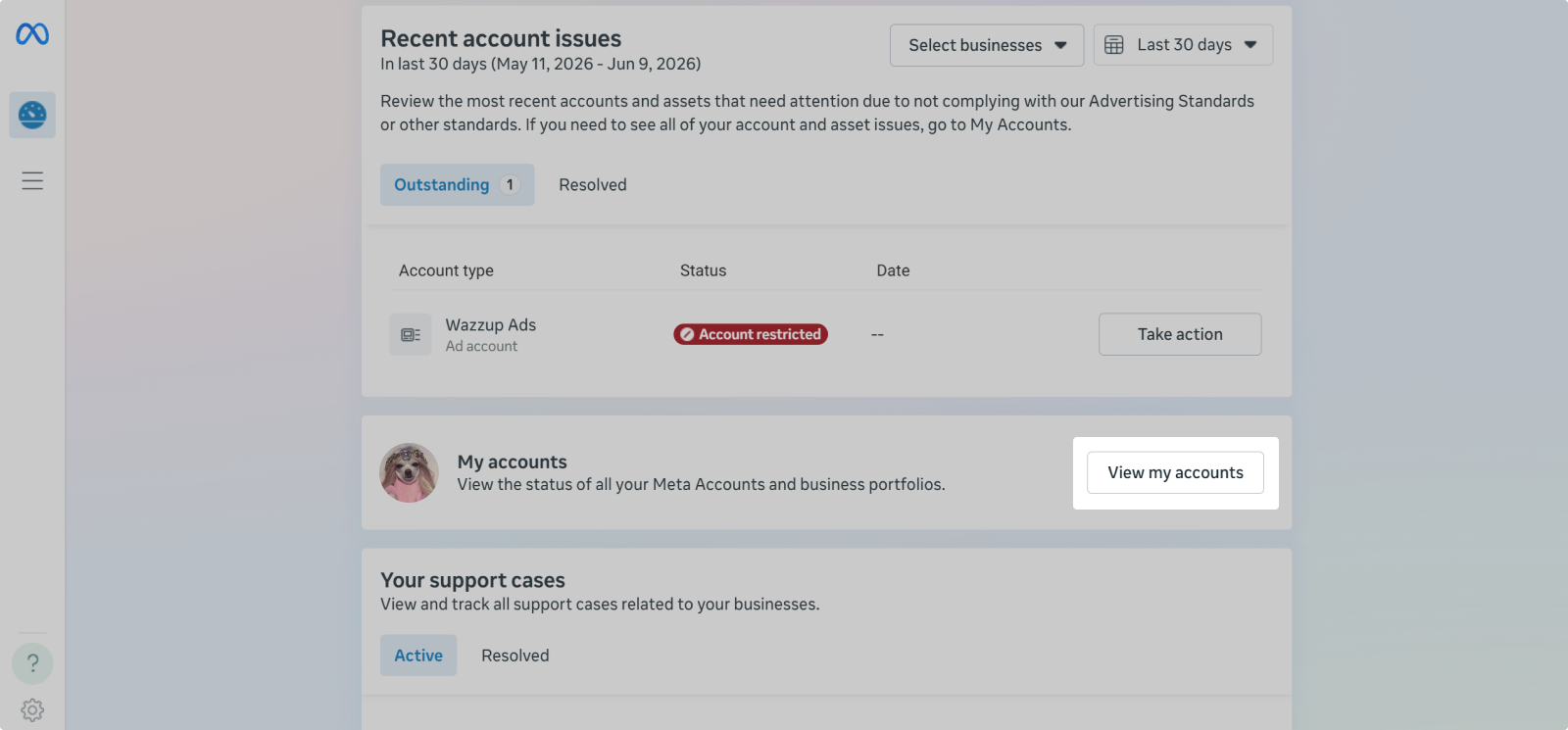
If there are restrictions, the business portfolio row will indicate "assets restricted". Click on the business portfolio to see details.
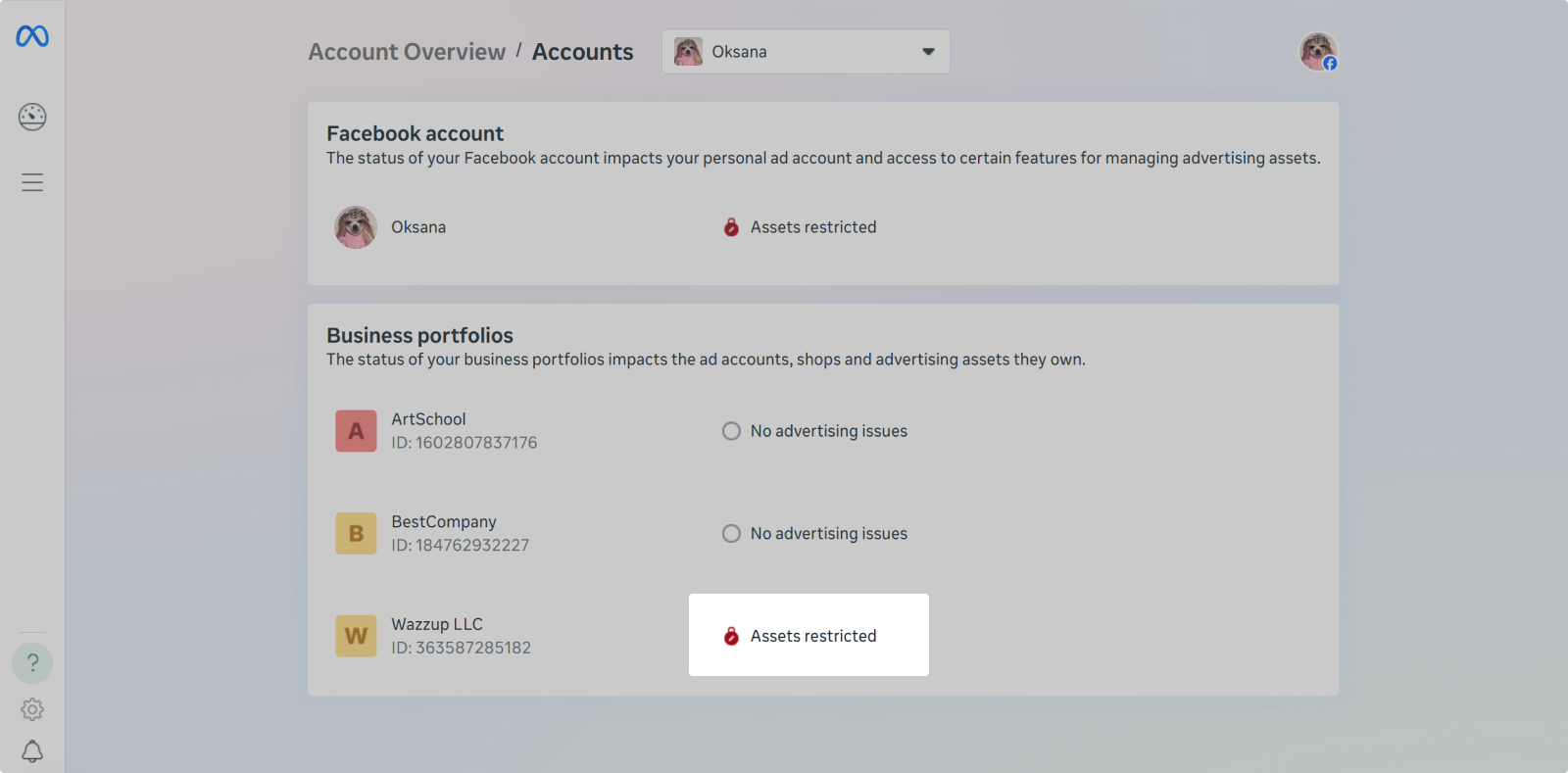
One possible reason for issues sending messages in Instagram is a blocked personal Facebook account.
👉 What to do if your Facebook account is blocked
In Instagram
Go to your Instagram account settings → under "More info and support", click "Account status".
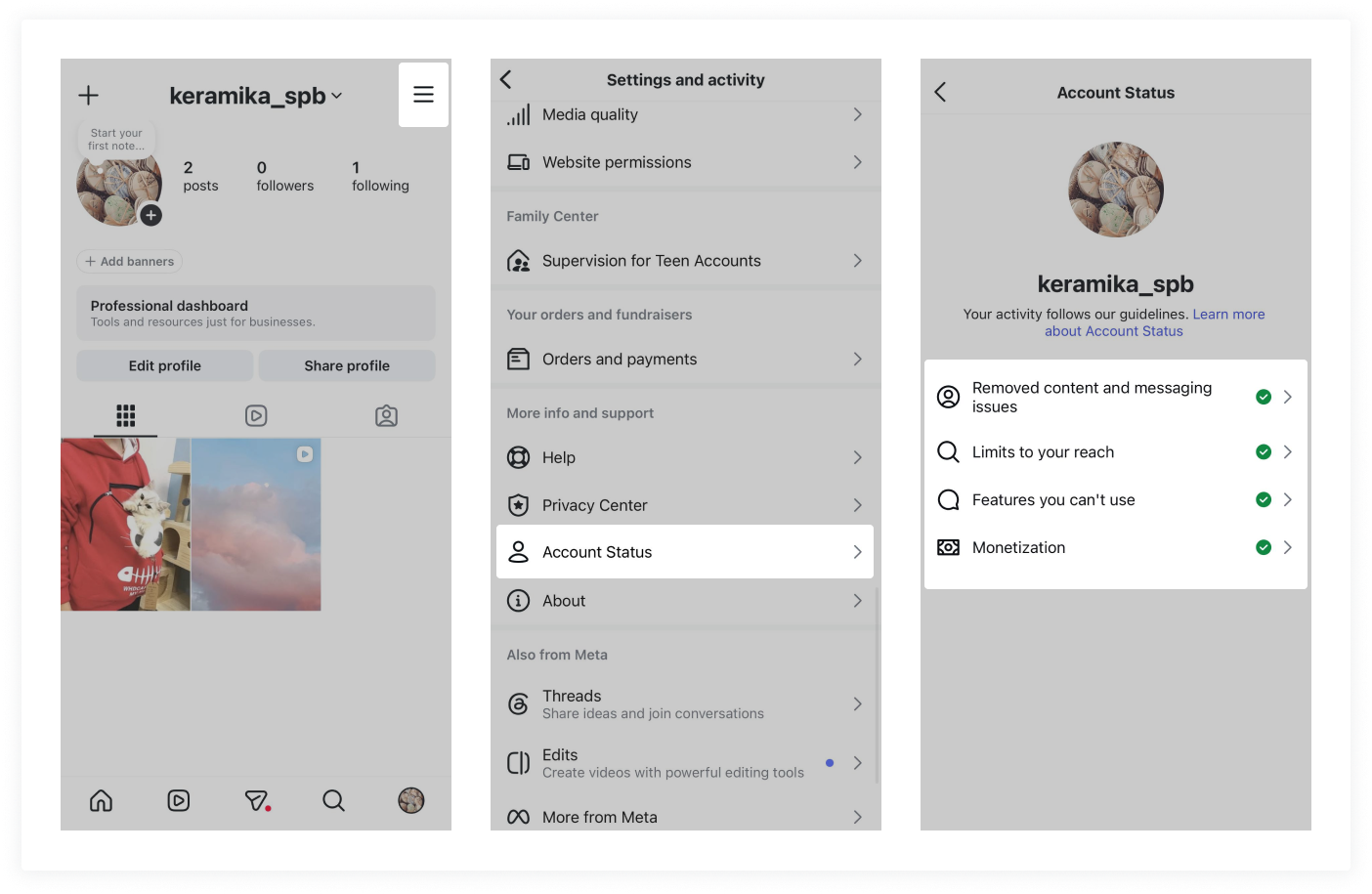
If there are restrictions, you will see yellow exclamation marks instead of green checkmarks. Click on the warning to see details.
If you see restrictions, read the explanations from Meta and Instagram and follow the recommended actions.
If there are no restrictions, wait 24 hours, rephrase your message, and try again.
What to do if you are restricted
If the restriction is temporary and only affects some actions, follow the recommendations from Meta and Instagram. Wait 24 hours and check for restrictions again.
While restricted, do not perform repetitive actions — otherwise, you may trigger further suspicion.
If you are permanently banned, your account will likely not be restored. If your Page has been removed, contact Instagram support. Let them know your account is blocked and ask for an explanation.
If Meta has blocked your personal Facebook account:
1. Create a new Facebook account. Build out the page: add a profile picture, a bio, a few subscriptions to create the appearance of activity.
2. After 24 hours, follow steps 2 through 6 in the Instagram connection guide: add a business portfolio, link a public Facebook Page and Instagram account to it, and reconnect the channel. If you do this immediately, your new personal Facebook account may get banned.
How to reduce the risk of being restricted
Follow Instagram's Community Standards and these recommendations for messaging:
Do not spam. Do not send users messages or comments they are not expecting — people may report you. Ultimately, spam will lead to a ban, not to increased sales.
Do not send the same templates too often. Instagram may restrict you for this — such activity is seen as automation or spam. Try to personalize each message.
Be careful with templates that contain images. Wazzup templates allow you to attach images, but in Instagram, each image is sent separately — right after the message, not together with the text.
You don't have to stop using templates altogether. Use them, but take breaks so your activity does not look like spam.
Don't shorten links. They may look suspicious to customers.
Do not use bots or automation. For example, for broadcasts asking customers to rate a manager's performance.
Send messages with breaks and do not write too often. If you actively reply to comments and messages, Instagram may temporarily restrict you.
There is no official information about limits, so we cannot say how often or how much you can message. Various limits are shared online, but there is no guarantee that following them will protect you from restrictions.
After a restriction is lifted, gradually return to messaging and account activity — sudden activity may attract attention from Instagram again.
Quick recommendations for working with messages and comments:
- Do not engage in mass messaging and, whenever possible, personalize each message;
- Use templates with breaks so your activity does not look like spam;
- Turn off automation;
- Do not message users too often — send messages and comments with breaks.