'%3e%3cpath%20d='M10%2020C15.5228%2020%2020%2015.5228%2020%2010C20%204.47715%2015.5228%200%2010%200C4.47715%200%200%204.47715%200%2010C0%2015.5228%204.47715%2020%2010%2020Z'%20fill='%23F0F0F0'/%3e%3cpath%20d='M19.378%2013.4785C19.78%2012.3951%2020%2011.2234%2020%2010.0002C20%208.77701%2019.78%207.60529%2019.378%206.52197H0.621992C0.220039%207.60529%200%208.77701%200%2010.0002C0%2011.2234%200.220039%2012.3951%200.621992%2013.4785L10%2014.348L19.378%2013.4785Z'%20fill='%230052B4'/%3e%3cpath%20d='M9.9991%2019.9998C14.2987%2019.9998%2017.9642%2017.286%2019.3771%2013.478H0.621094C2.03402%2017.286%205.69945%2019.9998%209.9991%2019.9998Z'%20fill='%23D80027'/%3e%3c/g%3e%3cdefs%3e%3cclipPath%20id='clip0_586_4336'%3e%3crect%20width='20'%20height='20'%20fill='white'/%3e%3c/clipPath%3e%3c/defs%3e%3c/svg%3e)
'%3e%3cpath%20d='M10%2020C15.5228%2020%2020%2015.5228%2020%2010C20%204.47715%2015.5228%200%2010%200C4.47715%200%200%204.47715%200%2010C0%2015.5228%204.47715%2020%2010%2020Z'%20fill='%23F0F0F0'/%3e%3cpath%20d='M9.56445%209.99982H19.9992C19.9992%209.09725%2019.8789%208.22287%2019.6547%207.39111H9.56445V9.99982Z'%20fill='%23D80027'/%3e%3cpath%20d='M9.56445%204.78254H18.5315C17.9193%203.78363%2017.1366%202.9007%2016.2241%202.17383H9.56445V4.78254Z'%20fill='%23D80027'/%3e%3cpath%20d='M9.99828%2020.0001C12.3518%2020.0001%2014.5149%2019.1866%2016.2231%2017.8262H3.77344C5.48164%2019.1866%207.6448%2020.0001%209.99828%2020.0001Z'%20fill='%23D80027'/%3e%3cpath%20d='M1.46699%2015.2171H18.5315C19.023%2014.4152%2019.4041%2013.5386%2019.6548%2012.6084H0.34375C0.594414%2013.5386%200.975547%2014.4152%201.46699%2015.2171Z'%20fill='%23D80027'/%3e%3cpath%20d='M4.63219%201.56164H5.54348L4.69582%202.17746L5.01961%203.17391L4.17199%202.55809L3.32437%203.17391L3.60406%202.31309C2.85773%202.93477%202.20359%203.66313%201.66453%204.47469H1.95652L1.41695%204.86668C1.33289%205.00691%201.25227%205.14937%201.175%205.29395L1.43266%206.08695L0.951953%205.7377C0.832461%205.99086%200.723164%206.24973%200.624922%206.51398L0.908789%207.38773H1.95652L1.10887%208.00356L1.43266%209L0.585039%208.38418L0.0773047%208.75309C0.0264844%209.1616%200%209.57769%200%2010H10C10%204.47719%2010%203.82609%2010%200C8.02453%200%206.18301%200.573047%204.63219%201.56164ZM5.01961%209L4.17199%208.38418L3.32437%209L3.64816%208.00356L2.80051%207.38773H3.84824L4.17199%206.39129L4.49574%207.38773H5.54348L4.69582%208.00356L5.01961%209ZM4.69582%205.09051L5.01961%206.08695L4.17199%205.47113L3.32437%206.08695L3.64816%205.09051L2.80051%204.47469H3.84824L4.17199%203.47824L4.49574%204.47469H5.54348L4.69582%205.09051ZM8.60656%209L7.75895%208.38418L6.91133%209L7.23512%208.00356L6.38746%207.38773H7.4352L7.75895%206.39129L8.0827%207.38773H9.13043L8.28277%208.00356L8.60656%209ZM8.28277%205.09051L8.60656%206.08695L7.75895%205.47113L6.91133%206.08695L7.23512%205.09051L6.38746%204.47469H7.4352L7.75895%203.47824L8.0827%204.47469H9.13043L8.28277%205.09051ZM8.28277%202.17746L8.60656%203.17391L7.75895%202.55809L6.91133%203.17391L7.23512%202.17746L6.38746%201.56164H7.4352L7.75895%200.565195L8.0827%201.56164H9.13043L8.28277%202.17746Z'%20fill='%230052B4'/%3e%3c/g%3e%3cdefs%3e%3cclipPath%20id='clip0_1008_13251'%3e%3crect%20width='20'%20height='20'%20fill='white'/%3e%3c/clipPath%3e%3c/defs%3e%3c/svg%3e)
'%3e%3cpath%20d='M10%2020C15.5228%2020%2020%2015.5228%2020%2010C20%204.47715%2015.5228%200%2010%200C4.47715%200%200%204.47715%200%2010C0%2015.5228%204.47715%2020%2010%2020Z'%20fill='%23F0F0F0'/%3e%3cpath%20d='M0.34375%2012.6089C1.26711%2016.0348%203.96465%2018.7324%207.39059%2019.6557V12.6089H0.34375Z'%20fill='%23D80027'/%3e%3cpath%20d='M7.39055%200.344727C3.96465%201.26805%201.26707%203.96562%200.34375%207.39152H7.39059V0.344727H7.39055Z'%20fill='%230052B4'/%3e%3cpath%20d='M19.6562%207.39152C18.7329%203.96562%2016.0353%201.26805%2012.6094%200.344727V7.39156H19.6562V7.39152Z'%20fill='%23D80027'/%3e%3cpath%20d='M12.6094%2019.6557C16.0353%2018.7324%2018.7329%2016.0348%2019.6562%2012.6089H12.6094V19.6557Z'%20fill='%230052B4'/%3e%3cpath%20d='M12.608%209.99982C12.608%2011.4406%2011.4401%2012.6085%209.99934%2012.6085C8.55859%2012.6085%207.39062%2011.4406%207.39062%209.99982C7.39062%208.55904%209.99934%207.39111%209.99934%207.39111C9.99934%207.39111%2012.608%208.55904%2012.608%209.99982Z'%20fill='%23496E2D'/%3e%3cpath%20d='M7.39062%209.99982C7.39062%208.55904%208.55859%207.39111%209.99934%207.39111C11.4401%207.39111%2012.608%208.55904%2012.608%209.99982'%20fill='%230052B4'/%3e%3cpath%20d='M8.5332%208.6958V10.3262C8.5332%2011.1367%209.19016%2011.7936%2010.0006%2011.7936C10.811%2011.7936%2011.468%2011.1367%2011.468%2010.3262V8.6958H8.5332Z'%20fill='%23D80027'/%3e%3c/g%3e%3cdefs%3e%3cclipPath%20id='clip0_1008_13324'%3e%3crect%20width='20'%20height='20'%20fill='white'/%3e%3c/clipPath%3e%3c/defs%3e%3c/svg%3e)


Working with subscription
After registration, you will be able to test the service for free. To continue using the service when the test period is over:
- for WhatsApp, Telegram, Instagram API you need to create a subscription yourself,
- for WhatsApp Business API (WABA) you can pay for the subscription where the channel is already in and not create a new one,
- for Telegram Bot a free subscription is automatically created. If the conditions of a free subscription (up to 500 dialogs per month) do not suit you, you can buy a subscription with Max rate and correspond without restrictions.
How to create a subscription
1. Go to the "Subscriptions" section in your Wazzup account → click "Add Subscription".
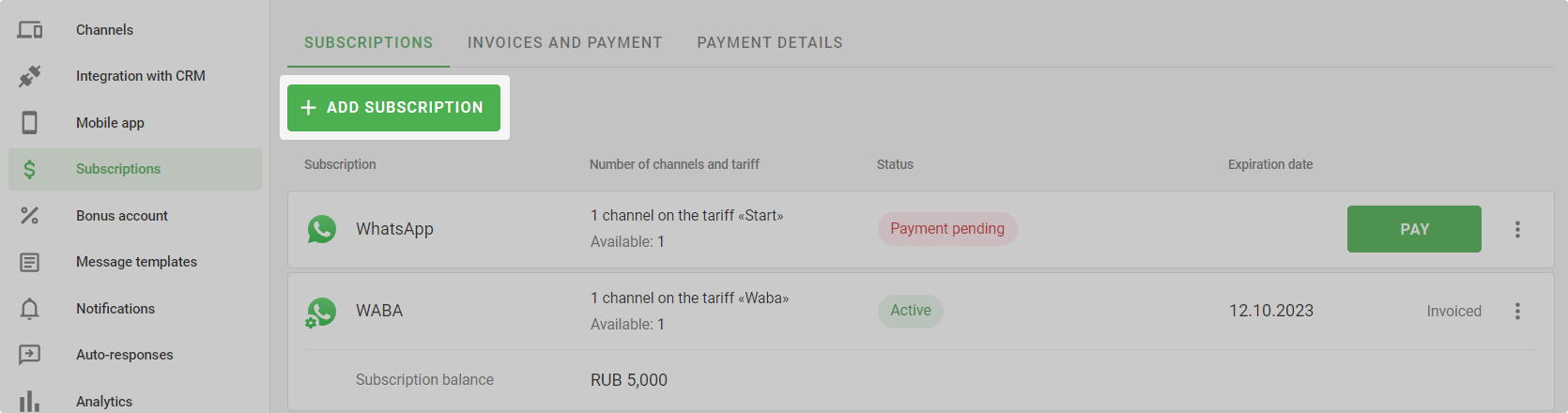
2. Select which channel you are subscribing to.
3. Specify the number of channels, and select the price plan and subscription term. The longer the subscription period, the lower the price per channel per day of operation.
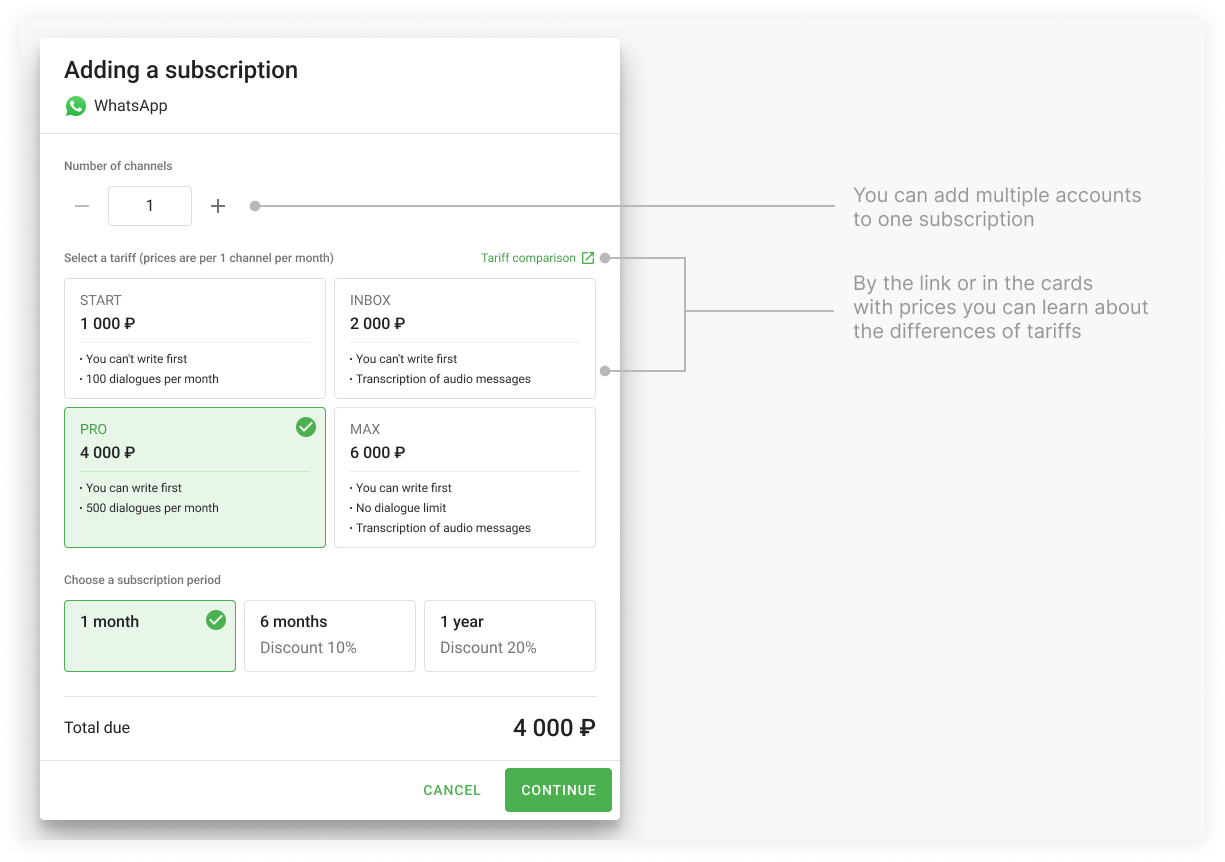
Click "Continue".
4. If subscribing to WABA, enter the balance amount → Continue.
5. Select a payment method.
If you have bonuses on your account, you can pay for the subscription partially or completely with them.
If you pay with a bank card — auto-renewal will start, so that the service is not suddenly disconnected.
Click "Pay".
Done — you have created a subscription.
Funds paid via bank transfer are credited to the balance within three business days. If you urgently need to launch a mailing or activate a channel, you can top up your subscription balance using a bank card — in this case, the funds will be credited immediately.
How to renew a subscription
You can renew a subscription in advance without waiting for it to end. To do this, follow the instructions:
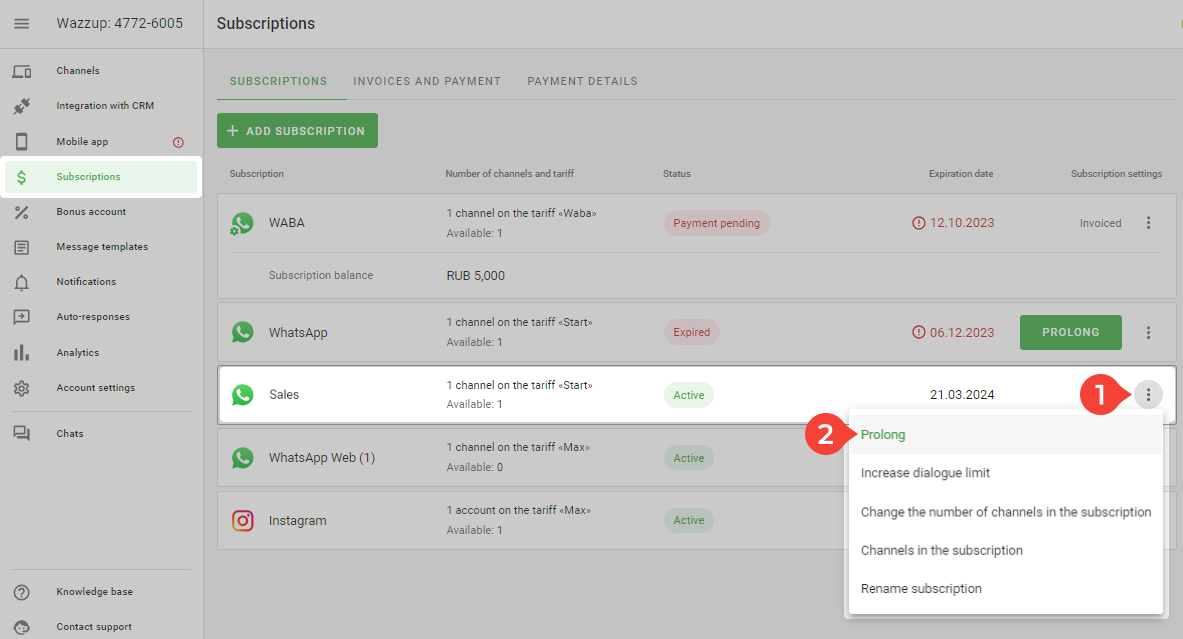
1. Go to the "Subscriptions" section.
2. In the left list, find the subscription you want to extend.
3. Click on the three dots ⋮ ("Subscription settings") → "Renew".
How to top up your WABA subscription balance
A WABA subscription has a balance used to pay for messaging sessions with customers. The cost depends on the country where the phone number is registered and the type of session.
1. Go to the "Subscriptions" section in your Wazzup account.
2. Find the required WABA subscription and click the three dots on the right → "Top up balance."
3. Enter the top-up amount.
4. Click "Continue" and select a payment method.
5. Complete the payment.
How auto-renewal works
Auto-renewal is enabled when you pay for the service with a card. The next payment is deducted two hours before the end of the subscription. We renew the service for the period of the last subscription at the same plan.
If you choose to turn off auto-renewal:
1. Go to the "Subscriptions" section.
2. Click on the three dots ⋮ in the line with the required subscription → Disable autorenewal.
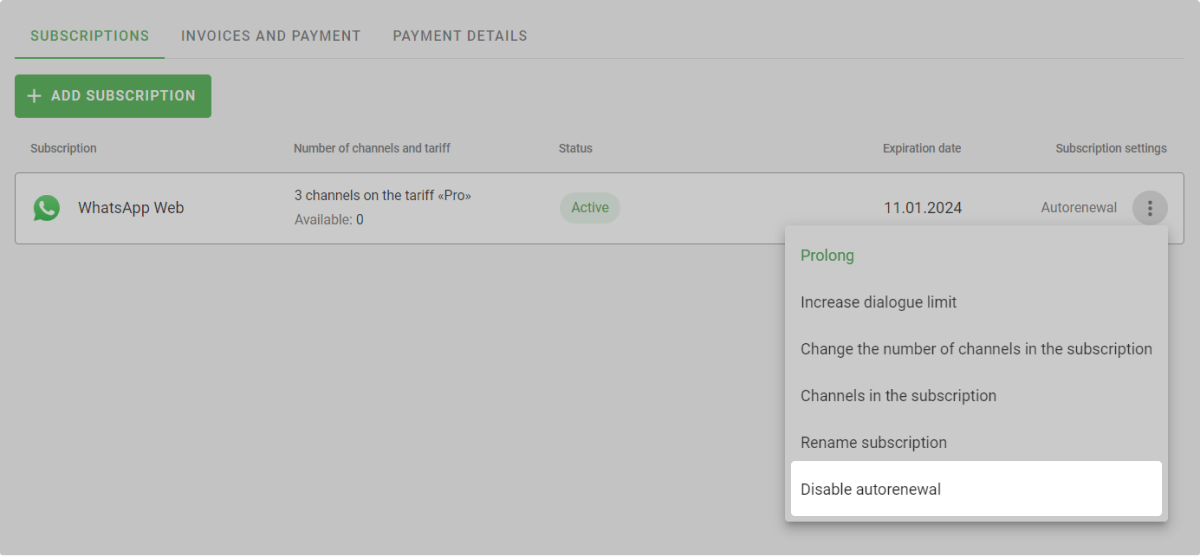
3. Turn off the setting → Save.
How to change a channel in a subscription
Channels will be added to the subscription automatically after payment. For example, if you have 2 WhatsApp channels in your account and you add a subscription to 1 channel, Wazzup will randomly select a channel and add it to your subscription.
To change a channel in the subscription:
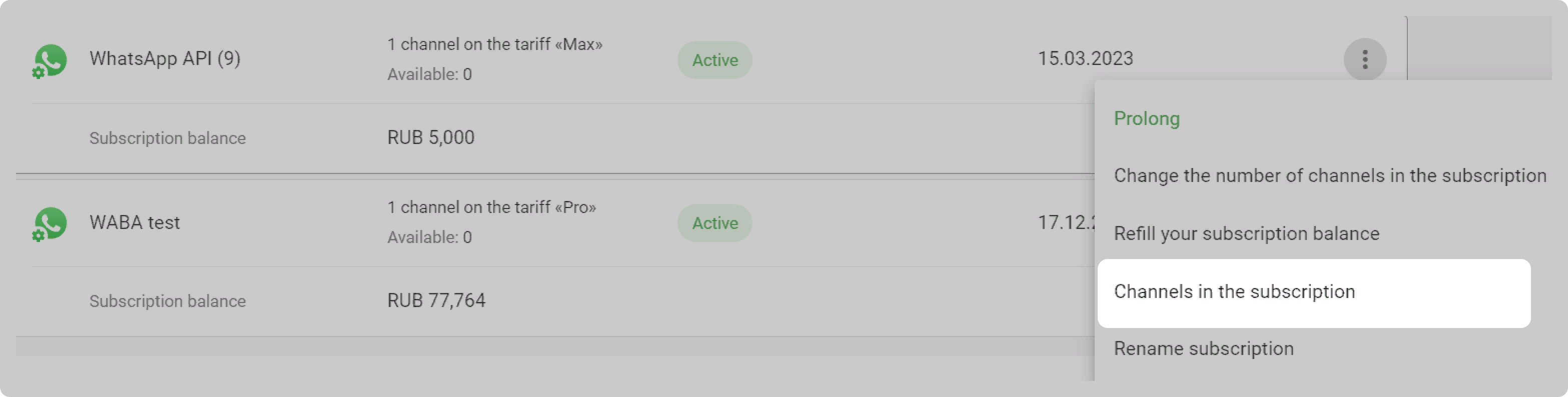
1. In the subscription line, press ⋮ and select "Channels in the subscription":
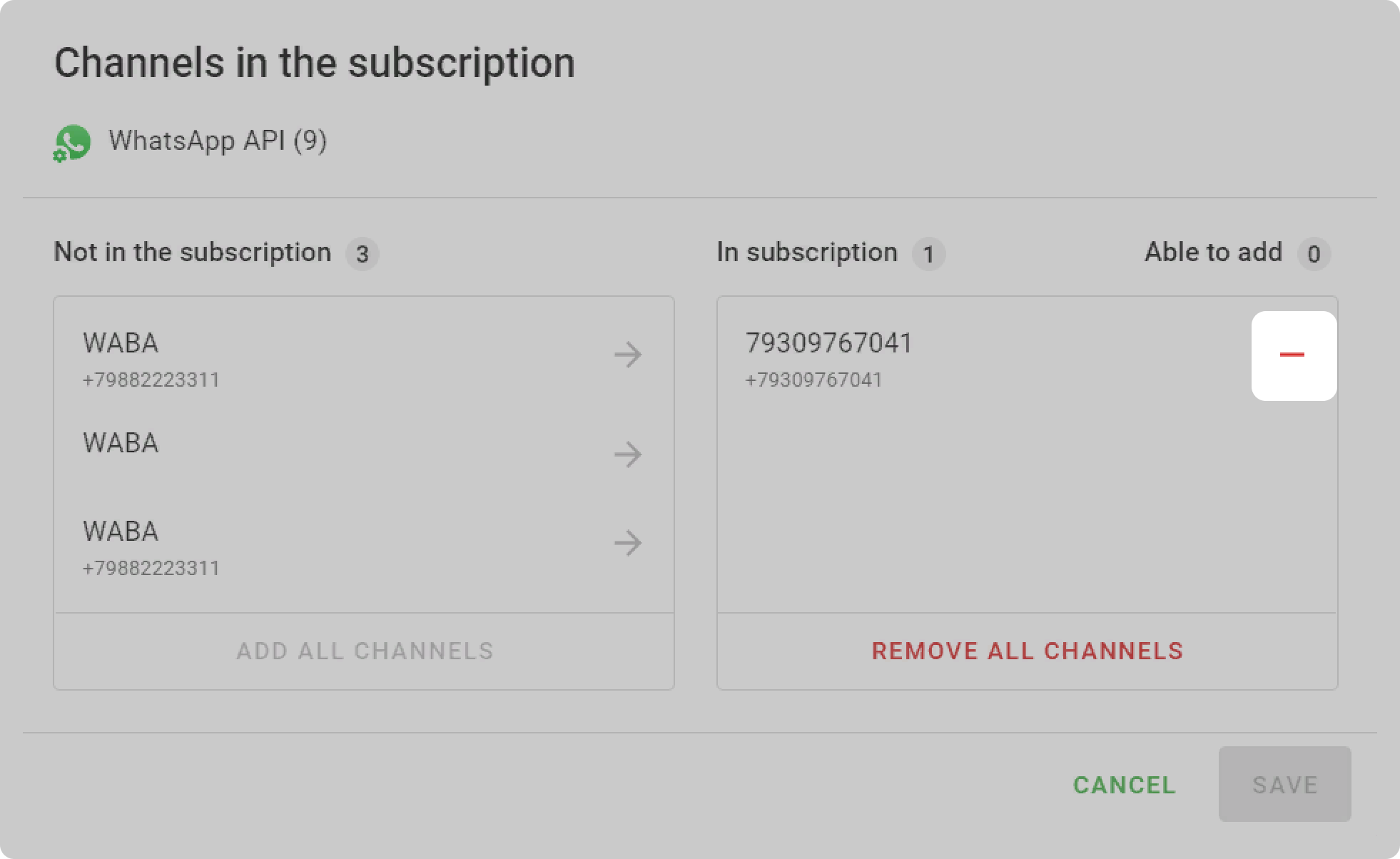
2. Click on the minus in the right column of the channel you want to remove from the subscription:
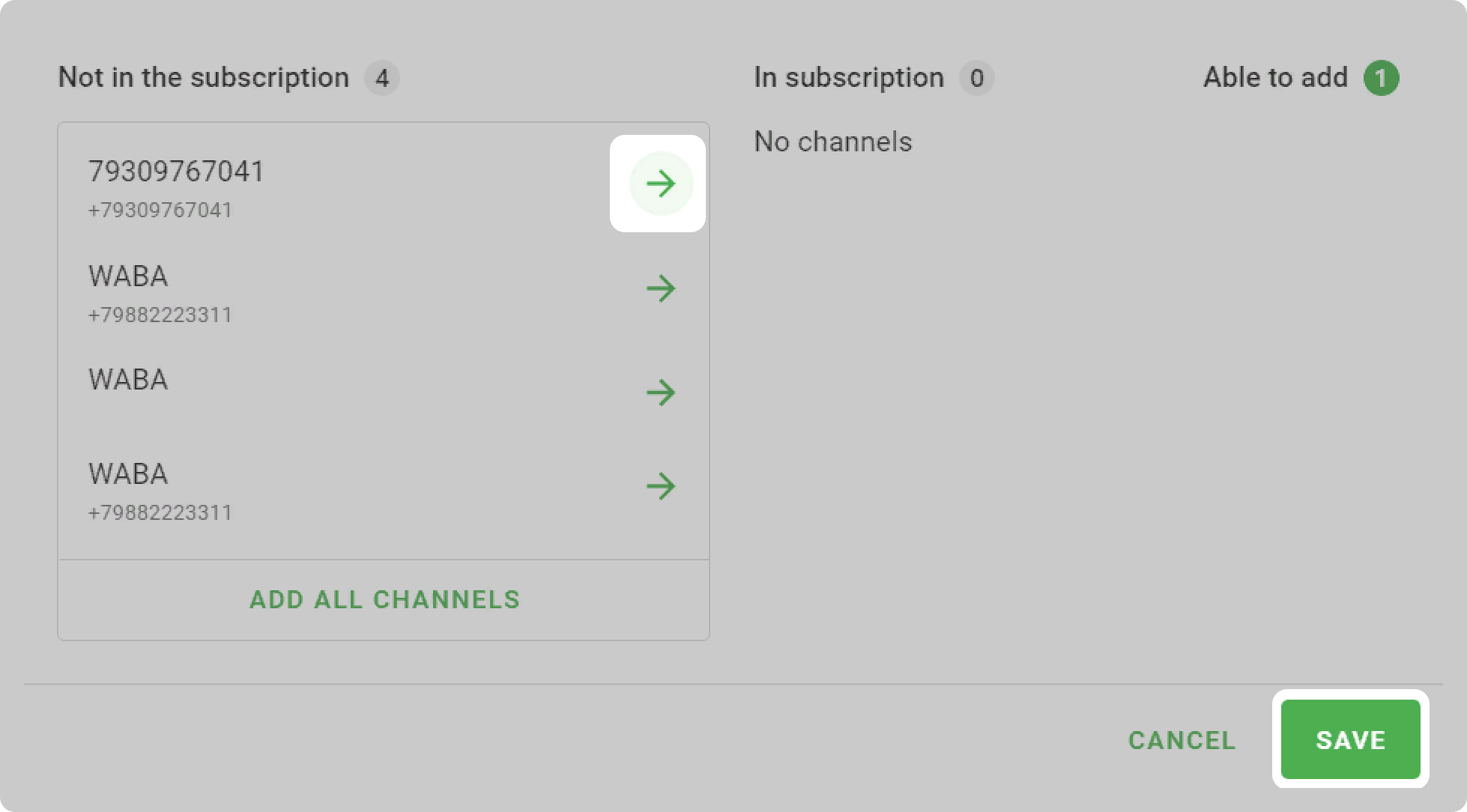
3. Click on the arrow in the left column of the channel that want to add to the subscription → "Save".
How to change the number of channels in a subscription
1. Go to the "Subscriptions" section in your Wazzup account.
2. Click ⋮ to the right of the subscription and select "Change the number of channels in the subscription".
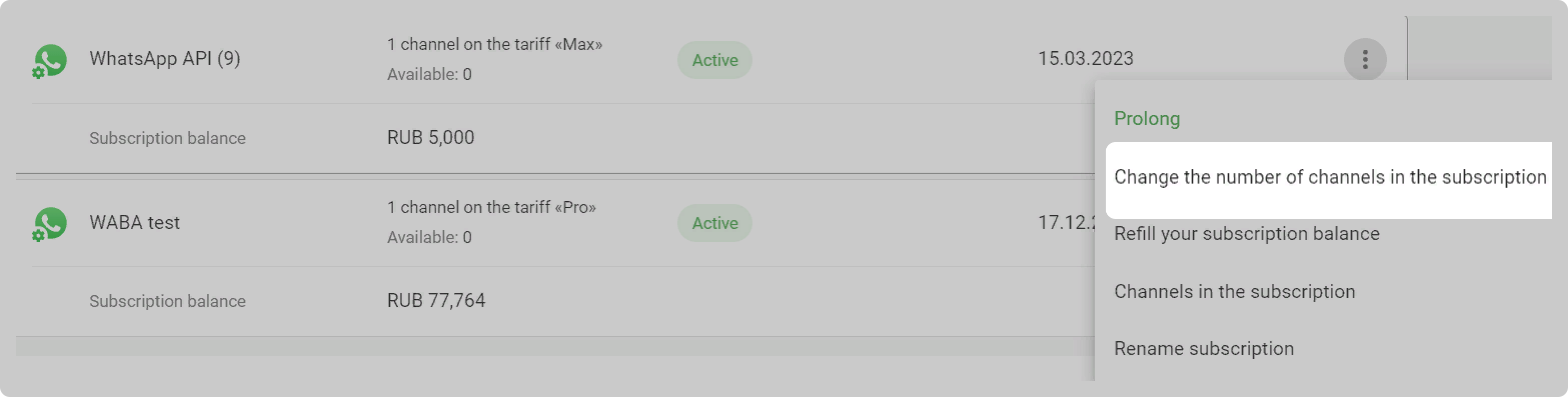
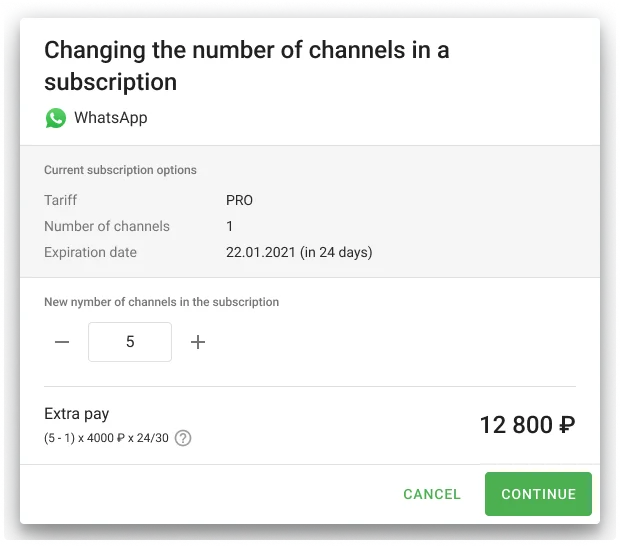
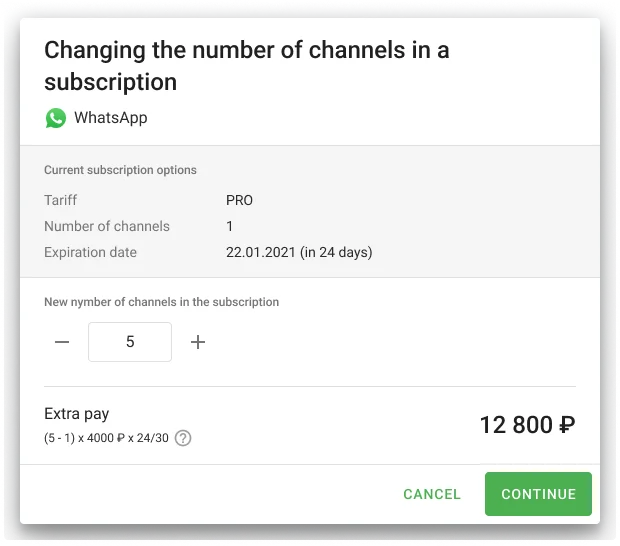
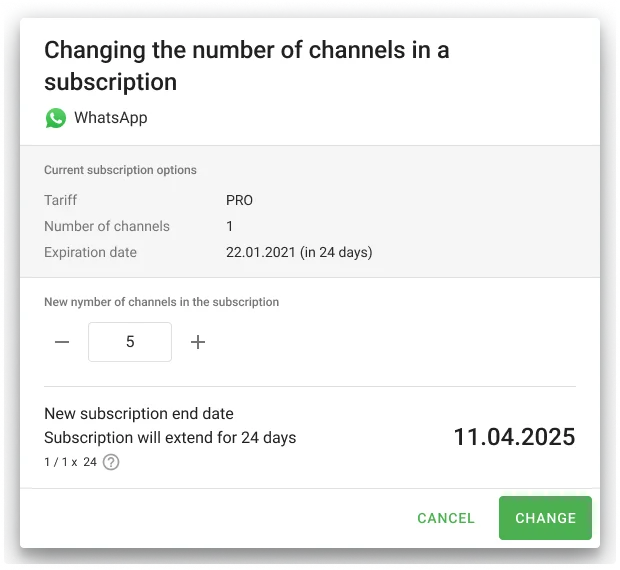
3. Enter the new number of channels. For example, if you subscribe to 1 channel and want to add 4 more channels, enter "5" in the field. If you had 5 channels and want to remove 4 channels, enter "1" in the field.
4. Click "Continue" or "Change" depending on whether you are increasing or decreasing the number of channels.
5. If you increase the number of channels, select the payment method and pay the required amount.
Done. You have changed the number of channels in your subscription.
We calculate the amount for the number of days left until the end of the current subscription. Let's say you paid for 676 days on the "Pro" plan. You decide to add 1 more channels. In this case, you need to pay extra for 676 days of operation of 1 channels on the "Pro" plan.
We calculate how many days were paid for the channels removed from the subscription, and increase the subscription period by the same number of days. For example, you paid for a subscription to 2 channels. There are 676 days left until the end of the subscription. You have decided to remove 1 channels from your subscription. In this case, your subscription will be renewed for 676 days.
How to increase the conversation limit in a subscription
To increase the conversation limit, you need to switch to another plan. The limit will not change if you simply renew the subscription at the previously selected plan — the dialogue counter is updated regardless of the subscription payment date every month on the 1st day.
1. Go to the "Subscriptions" section in your Wazzup account.
2. Click ⋮ to the right of the subscription and select "Increase dialogue limit".
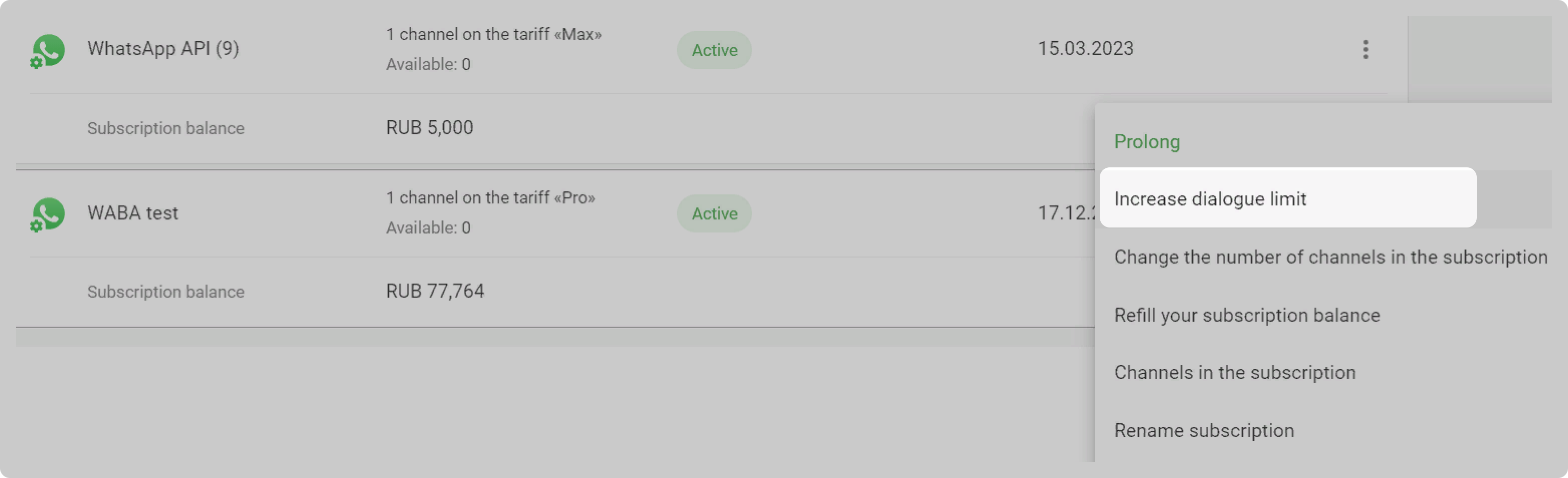
3. Select a new one and click "Continue".
4. Choose a payment method and pay the difference in price for the remaining subscription period.
Done. You have increased the dialogue limit.
In the example, the surcharge is calculated according to the formula (€90 — €15) x 1 x 24 / 30, where:
- (€90 — €15) — difference in cost of plans
- 1 — channels in the subscription
- 24 / 30 — days before the end of the subscription